CHOOSING A TRAVEL TRANSLATION TOOL
Menu translator app vs. camera translation for travel
General camera translation is useful for many kinds of text. Restaurant menus create a more specific problem: travelers need to understand the dish, keep its position and price in view, and notice details worth confirming.
What general camera translation does well
Camera translation can quickly read signs, labels, notices, and short blocks of text in many languages. It is often the fastest choice when you only need the meaning of a word or sentence.
Restaurant menus are harder because names, descriptions, prices, photos, and categories share a complex layout. A translated overlay may separate text from the dish it describes, and local dish names may remain unclear.
What a menu translator can add
Dish explanations, not only translated names
A literal translation may not reveal the main ingredient or cooking method. A short dish explanation helps travelers compare options even when a traditional name has no direct equivalent.
The original menu layout stays useful
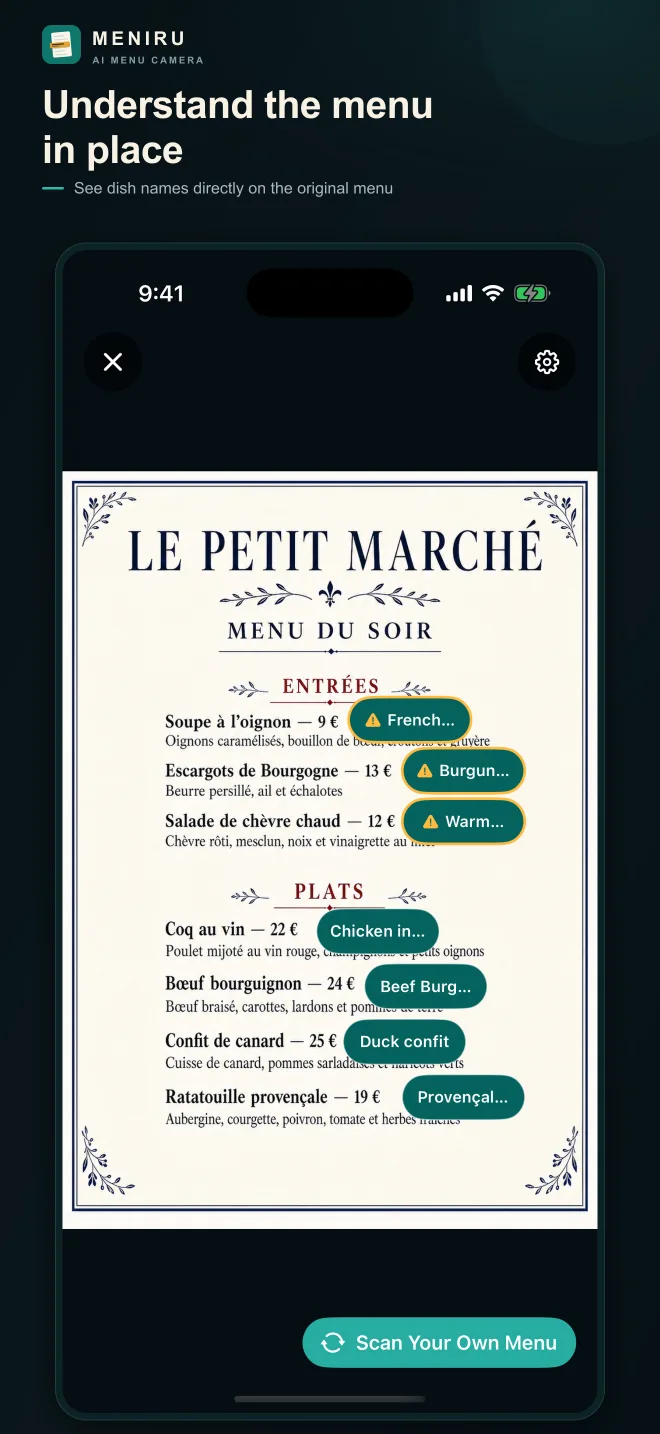
Meniru places labels over their original positions so you can still see the menu section, price, nearby photo, and neighboring dishes without matching against a separate result list.
Extra context for decisions
Dish details, image search, and dietary caution hints help you narrow down what to order and what to ask. These features provide context, but they do not replace restaurant confirmation for safety-sensitive information.
Which tool to use while traveling
- Read signs, labels, and short notices: general camera translation
- Ask and answer questions with staff: conversation translation
- Compare dishes in their original positions: a menu-focused translator
- Confirm ingredients and preparation: restaurant documentation and staff
The tools complement one another. You might use a menu translator to identify two promising dishes, then use conversation translation to ask one focused question before ordering.
See foreign menu information where it belongs
View dish names, explanations, and caution hints directly on the menu.
Try Meniru on the App Store